What is the status of my online order?
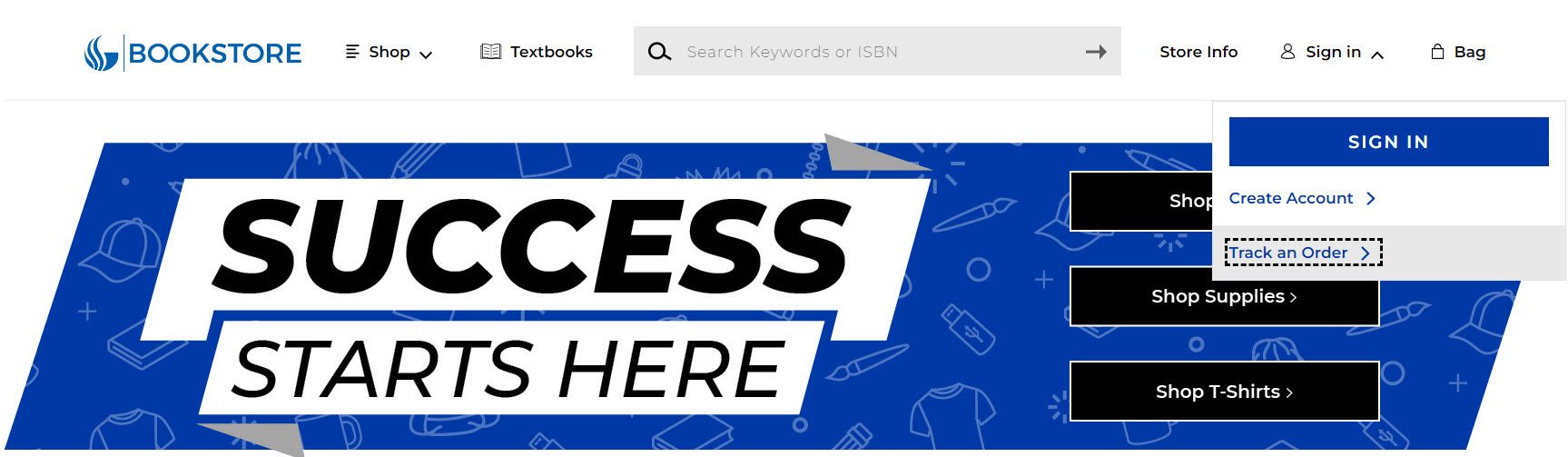
You can track your order here.
- You will receive an order confirmation via email when you place your order.
- If you do not receive an order confirmation, please check your spam folder in case the email was blocked.
- Orders take 1 to 2 business days to process.
- You will receive an email with tracking for each item, once that item has shipped.
- Some items may come from other locations or 3rd party shippers. These may take additional time to process and ship. Please allow one additional day after you have received the Your Order Is Ready For Pick Up email before coming in.
- Some items may go on back order. Tracking for back ordered items will be provided once the item ships.
- Unavailable items will be cancelled the item cannot be sourced. You will never be charged for a cancelled item.
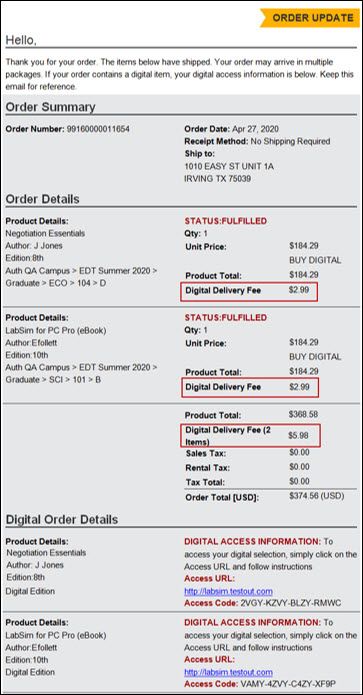
- Digital access codes are on your order confirmation (see more information on Digital below).
- If you have received an incorrect item, or an item that was not received as stated in the tracking proof of delivery, contact the store.
Please Note:
Due to the high volume of orders and the various stages of fulfillment, order changes and/or refunds can’t be processed until the item has been fulfilled. If you have an item that has been shipped, you may return it to any campus store for a refund. If you have an item for pick up, you will need come in person for a refund, after you have received Your Item Is Ready For Pick Up email, to obtain a refund. Non-digital refunds are not processed via phone or email. Digital books may be refunded via email request. (see more information on Refunds below)
How do I recieve my digital book?
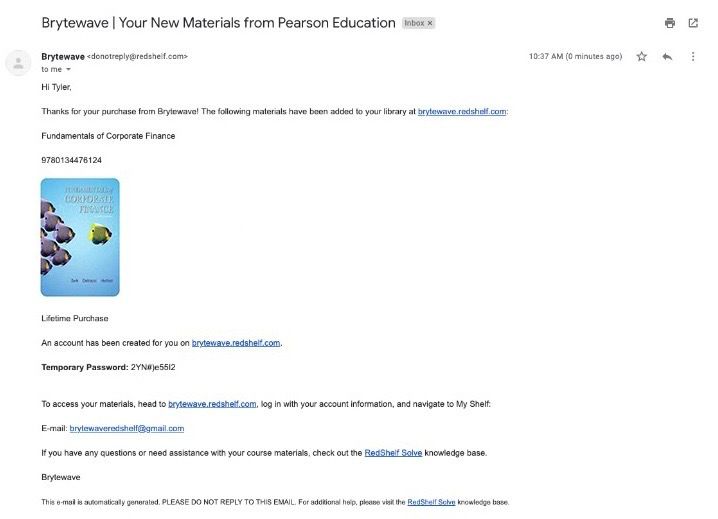
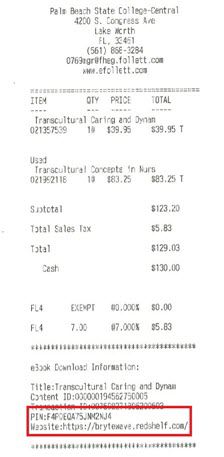
Digital Book access codes can come in 1 of 3 ways. You may also access codes via order history:
My Account > Orders > View Order Details
Note: Start with the access URL sent with your code. If this URL does not accept your code, see your instructor. Some codes require you go to specific URLs set up by your instructor to redeem.
- Online: On your order confirmation that was emailed to you when you placed your order.
- Online via an email sent to your order email (within 24hrs): Courseware products (My Math Lab, Cengage Unlimited, Connect Etc.), are sent via email. You will need to follow the instructions to redeem your purchase code for a code to input on you class specific URL - see your instructor for the URL.
- In Person: On the bottom of your register receipt.
Where can I get support for my BryteWave digital book?
BryteWave offers customer service and technical support 24/7 by phone or by email:
- Phone: 1-877-612-2233
- Email: customerservice@brytewave.com
Additional support information, FAQ’s, how-to’s, and technical sepcs available at the link below
Redeem Your RedShelf Access Code
For any other issues relating to digital products or any other questions, please visit our list of publisher support resources.
How do I get a refund or exchange?
Please visit our return policy for specific information.
The last day for refunds will be posted within the announcements section of our website.
Please keep in mind:
- You must have the original receipt/order confirmation for a refund or exchange
- Items must be in their original packaging and unopened
- Shrink wrapped items cannot be opened
- Apparel must have all original tags attached
- New books must have no evidence of use
- Nursing kits and uniforms are non-refundable
- Software downloads (non-textbook) are final
- Computer Hardware (including laptops and tablets), software and accessories can be returned within 14 days, but must be unopened and in resaleable condition
For digital text refunds email gsudigital@follett.com
Please include your order number and the exact item you would like refunded.
Due to the high volume of orders and the various stages of fulfillment, order changes and or refunds can’t be processed until the item has been fulfilled. If you have an item that has been shipped, you may return it to any campus store for a refund. If you have an item for pick up, you will need come in person for a refund, after you have received “your item is ready for pick up email,” to obtain a refund. Non-digital refunds are not processed via phone or email.
How do I know if I can use my Financial Aid at the bookstore?
Financial aid funds are available in store and through our website.
Please visit https://webservices.gsu.edu/lookup to retrieve your 16 digit ISO# for online book purchases. The deadline to use financial aid funds will be posted on the website.
The Panthercash eAccounts Mobile app is now available on IOS and Android devices! Please visit https://panthercard.gsu.edu/722-2/panthercash-eaccounts/ for more information.
To view your available balance, log in to your PantherCard Account with your Campus ID and password. These funds are made available from your financial aid award, up to a maximum of $1,250. Any remaining balance will be refunded after late registration.
Still have questions? Please contact the Enrollment Services Phone Center at 404-413-2600.
How do I use my VA/VR or other types of scholarships at the bookstore?
VA/VR recipients should contact their councilor to ensure an PO has been sent authorizing purchase.
Note: There are separate authorizations for tuition and books. Your councilor must send a separate book authorization to the bookstore. Authorizations are dated and may expire. Computers, laptops, back packs etc. require a separate authorization.
Other types of scholarships (State Farm, Independent Living, etc) - please contact your councilor to ensure an authorization has been sent to the bookstore.
Contact information for the bookstore to send authorizations may be found on our Store Info page.
How do I receive my course materials as a Dual Enrollment / Early College Scholarship student?
The Dual Enrollment textbook rental program is only for students who use Dual Enrollment funding to pay for their classes. The campus bookstore will loan/rent required textbooks and digital materials to Dual Enrollment students. Physical textbooks will be marked with a blue “Rental Book” sticker.
The only textbooks/ digital materials that may be obtained from the bookstore are for the college classes that our school counselor has listed on your Dual Enrollment Funding application in GAFutures.org
If you have exhausted your DE funding, and are paying out of pocket for any classes, you must pay out of pocket for those textbooks and digital materials.
All physical textbooks must be returned by you to the GSU bookstore at the end of the semester.
Materials must be picked up in person at the GSU Bookstore, even if you are taking online classes. A paper form is not required.
- If you are a Dual Enrollment student taking classes on the Atlanta campus: All textbook materials and digital codes must be picked up in person at the Atlanta campus bookstore.
- If you are a Dual Enrollment student taking classes on one of the Perimeter College campus locations: All textbooks and digital codes must be picked up in person on the same campus where the class is taught.
- If you are a Dual Enrollment student taking classes Online:You must visit the Newton, Clarkston, or Dunwoody campus bookstore.
To receive your books/digital codes you must have:
- Photo ID: GSU Panther Card preferred, or State Issued ID
- Your Panther ID number (002…) (before arriving at the bookstore.)
If you pick up your materials before the first day of class, please do not open any sealed packages before verifying with your professor that you have the right materials, codes, textbooks as listed on your syllabus. If you have the wrong item, you can exchange it at the bookstore.
If you arrive to the bookstore and the book/material is out of stock, please work with the bookstore to order the material.
The GSU Dual Enrollment Student Book Rental program is only with the GSU college bookstores only not any other outside or online vendor
Who do I contact?
Please reach out to the store for all order and general questions. Our contact information may be found on our Store Info page.
When are the campus stores open?
The store hours may be found on the Store Info page
Contact Us
Phone
Fax
404-413-9709
Contact Us
Address
66 Courtland ST SE
Georgia State Bookstore
Atlanta, GA US 30303-3021
Phone
Fax
404-413-9709



Questions or Comments ?
Send us a message and we'll get back to you as soon as possible
Questions or Comments ?
Send us a message and we'll get back to you as soon as possible